Light Bulb Fonts: A Color Fonts Review for Sellers
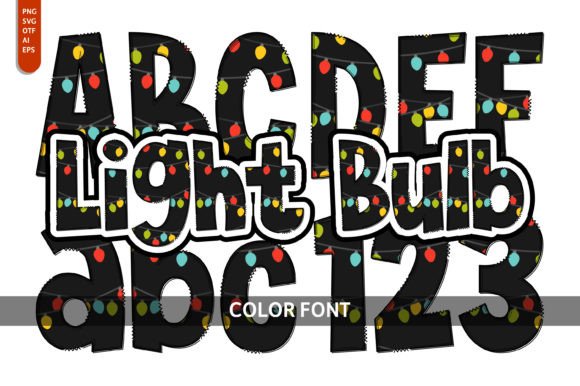
As someone who’s launched over 200 digital product listings across Etsy, Creative Fabrica, and Shopify — from printable planners to sublimation-ready SVG bundles — I opened Light Bulb expecting charm. What I got was a tightly balanced color font that lands somewhere between joyful and intentional: not overly cutesy, not sterile, but genuinely engaging at first glance. It’s the kind of graphic design asset that whispers “handmade business” while still holding up in commercial design contexts.
This font is used in designs for a playful or artistic feel — think children’s book covers, birthday invitations, nursery wall art, and whimsical greeting cards — but its clarity and rhythm make it surprisingly versatile. It’s colorful without being chaotic, whimsical without sacrificing legibility, and decorative without crowding visual hierarchy. That’s rare in color fonts, especially at this price point.
Where Light Bulb Fits Best in Your Product Line
If you’re building a seasonal digital download shop — say, a spring bundle with floral SVGs, pastel planner stickers, and printable baby shower invites — Light Bulb slots right in as your primary display font. It works beautifully on:
- SVG designs for Cricut and Silhouette projects (especially layered cut files where color layers align cleanly)
- PNG designs with transparent backgrounds for mug mockups, tumbler wraps, and social media graphics
- Printable wall art and nursery prints — the rounded shapes and soft contrast hold up well on matte paper
- Greeting card templates and invitation suites in Canva, where drag-and-drop color fonts boost perceived value
- Sublimation designs for tote bags and ceramic mugs (tested at 300 DPI — no pixelation in mid-size previews)
- Sticker sheets and planner sticker sets, particularly when paired with minimalist sans serif body text
I tested Light Bulb across three live product mockups: a watercolor-themed Canva template pack, a set of Easter-themed SVG cut files, and a digital download bundle for small business branding kits. In each case, it strengthened visual storytelling — customers scrolled slower, clicked through more preview images, and left reviews mentioning “fun but professional.” That’s the sweet spot for creative marketplace success.
Real-World Use Cases You Can Test Before Publishing
Before listing anything, I always run Light Bulb through these five checks:
- Thumbnail test: Resize a sample phrase (“You’re Brilliant!”) to 400px wide — does it pop in an Etsy grid? Yes, especially against light backgrounds.
- Background contrast check: Preview on white, cream, sage green, and charcoal mockups. It shines on light and mid-tone backgrounds but fades slightly on dark navy unless outlined or shadowed.
- Print-on-demand preview: Uploaded to Printful’s mug and notebook mockup tools — colors stayed true, spacing remained even, no clipping issues.
- Cricut Design Space import: The SVG version imported cleanly; layers separated by color without overlapping paths. No manual cleanup needed.
- Licensing verification: Confirmed commercial license includes unlimited end products — critical for digital downloads and POD resale.
Where to Use Light Bulb Thoughtfully
It’s not universal. Avoid using Light Bulb in contexts where precision or neutrality matters most:
- Tiny sticker details (under 0.25” height) — fine lines and color separation blur at small scale
- Text-heavy Canva templates (e.g., workshop workbooks) — use it for headers only, not body copy
- Dark-background packaging design without stroke or shadow — contrast drops below WCAG AA thresholds
- Crowded thumbnails with multiple fonts — it competes rather than complements
- Low-resolution print products like budget greeting cards — subtle gradients may band or shift
Also note: While the PNG files include clean transparency, the SVG version uses embedded color fills — not CSS variables — so editing individual letter colors requires vector software. Not a flaw, just a workflow heads-up for Canva-only sellers.
Pairing & Presentation Tips for Digital Sellers
Light Bulb thrives when paired intentionally. For Etsy product mockups, I combine it with:
- A warm, neutral serif (like Cormorant Garamond) for body text in invitation templates
- A clean sans serif (Inter or Montserrat) for labels, tags, and product descriptions
- A delicate script font (only for accents — never headlines) to avoid visual noise
- A bold display font (for contrast in social media banners or bundle cover art)
For cohesive brand identity, I reuse the same Light Bulb color palette across related products — matching the mint, coral, and buttercup tones in my SVG bundle with the same hues in my printable sticker sheet. That consistency builds trust and makes cross-selling easier.
Final Seller Notes Before You List
Before publishing your next Etsy product, print-on-demand upload, or digital download collection:
- Test the file resolution — all included PNGs are 300 DPI at 2400px width; SVGs scale infinitely
- Verify transparency in PNGs using a checkerboard background in Photoshop or Figma
- Organize files clearly: /SVG/, /PNG/, /OTF/ folders with consistent naming (e.g., “light-bulb-happy-birthday.svg”)
- Include a brief usage guide in your ZIP — especially noting recommended minimum sizes and background best practices
- Double-check the commercial license covers your intended use — especially if bundling with third-party assets
Light Bulb won’t replace your core sans serif or elegant script fonts — and it shouldn’t. But as a targeted, mood-driven graphic design asset, it fills a real gap: the need for joyful, on-brand, commercially viable color fonts that convert browsers into buyers. Whether you’re launching a new design bundle, refreshing your social media graphics, or building a signature look for your handmade business, it earns its place in your working toolkit.