Wavor: A Bold Color Font for Handmade Brands
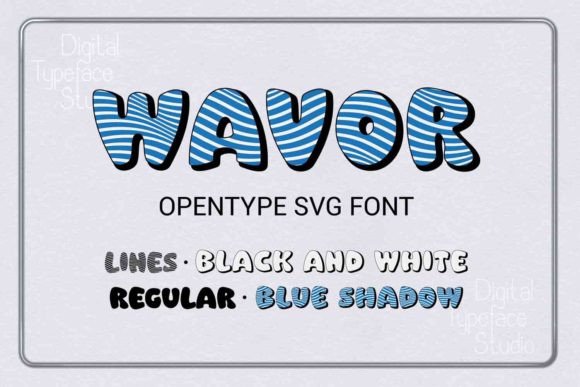
As a craft business owner who’s shipped over 5,000 custom mugs, planner stickers, and seasonal gift tags since 2018, I opened Wavor with high expectations—and got immediate chills. Not the “oh no, another overhyped font” kind—but the “yes, this *works*” kind. Wavor isn’t just another decorative typeface. It’s a graphic design asset built for real crafting: bold black-and-white strokes layered with a vibrant blue shadow that pops on vinyl, prints crisply on sublimation blanks, and holds its personality across sizes and substrates.
First Impressions: Festive, Confident, and Unapologetically Craft-Forward
Wavor lands somewhere between playful and premium—think modern cottagecore meets boutique gift shop signage. It’s not dainty or minimalist. It’s expressive, dimensional, and full of movement. The intricate linework suggests hand-drawn energy, while the strong contrast and intentional shadow give it shelf presence. I immediately pictured it on holiday mugs for my Etsy shop, foil-embossed gift tags for local craft fairs, and as the hero font in a summer printable bundle for planners and party hosts. My ideal customer? Creative moms, small business owners launching their first product line, and Etsy shoppers who choose handmade because they want *feeling*, not just function.
Where Wavor Shines in Real Crafting Workflows
- Cricut & Silhouette Projects: Wavor’s SVG design imports cleanly into Design Space and Silhouette Studio. I tested it at 4”, 6”, and 12” widths—no jagged edges, no stray nodes. Perfect for vinyl-cut tumbler wraps, layered tote bag decals, and large-scale wall quotes for baby showers.
- Sticker & Printable Design: As a PNG design, the transparency is flawless. I dropped it straight into Canva for planner sticker sheets and printable wall art—no background cleanup needed. Its visual weight makes it stand out even in dense sticker grids.
- T-Shirt & Mug Design: Used Wavor as the focal point on a sublimation mug mockup (white ceramic), and the blue shadow stayed rich—not washed out. On dark apparel, I reversed it to white-on-black with a subtle drop shadow, and it retained legibility and charm.
- Seasonal & Gift Products: It’s ideal for limited-edition collections: “Cozy Season” mugs, “You’re Invited” party favor tags, “Thank You So Much” handwritten-style thank-you cards (paired with a clean sans serif for body text), and printable scrapbooking elements like journaling cards and photo mats.
- Small Business Branding: I used Wavor for my new “Maker’s Market” collection logo—then scaled it down to 16px for social media bios. It held character without collapsing. Paired beautifully with a warm serif (like Playfair Display) for headings and a friendly sans (like Poppins) for descriptions.
Where to Use Wavor Thoughtfully—Not Just Automatically
Wavor is powerful, but power needs precision. Here’s where I slowed down:
- Very small cutting details: Below 1.5”, the fine interior lines can blur in vinyl weeding or print registration. I simplified one letterform manually in Illustrator for a 1” sticker sheet—just removed inner stroke overlap.
- Crowded compositions: Don’t stack Wavor with three other decorative fonts. Let it breathe. I paired it with one neutral script (for names) and one geometric sans (for dates/locations)—and called it a day.
- Layered vinyl projects: The blue shadow is part of the glyph—not an overlay. That means if you’re doing multi-layer vinyl (e.g., black base + blue shadow cut separately), you’ll need to separate layers manually. Check the vector paths before cutting.
- Dark product backgrounds: On navy shirts or charcoal tumblers, test how the shadow reads. Sometimes it fades—so I adjusted the blue to a slightly brighter cobalt in my design file for consistency.
Practical Crafter Notes You’ll Actually Use
Before adding Wavor to your next Etsy product or craft fair lineup, do these six things:
- Test the SVG design in your cutting software—zoom in to check anchor points and path integrity, especially on curved letters like “S” and “G.”
- Preview the PNG design at 300 DPI on both white and dark mockups—don’t rely on screen thumbnails.
- Confirm commercial license terms—Wavor Color Opentype SVG Font includes full commercial rights, but always verify if redistribution (e.g., in a design bundle) is permitted.
- Resize intentionally: At 8–12”, it’s commanding. At 2–3”, it’s charming—but avoid 0.75” unless simplified.
- Pair wisely: It sings with soft serifs (for elegance), rounded sans serifs (for approachability), or clean monoline scripts (for contrast). Avoid competing display fonts.
- Run a real-world test: Cut one mug decal, print one sticker sheet, and sublimate one coaster—before batching 50 units.
Why This Color Font Fits the Handmade Ecosystem
In a market flooded with generic fonts and AI-generated clipart, Wavor feels intentional. It’s not “trendy”—it’s *crafted*. As a handmade business owner, I don’t just need fonts—I need design assets that reinforce authenticity, support scalability, and convert browsers into buyers. Wavor delivers that. It works in Cricut projects and printable design alike. It elevates a $4 digital product and anchors a $45 gift box. It belongs in your design bundle library alongside trusted illustration and sublimation design files—not as filler, but as a signature element.
If you sell on Etsy, prep for craft fairs, run a print-on-demand side hustle, or design for creative marketplaces, Wavor isn’t just another font download. It’s a versatile, production-ready tool—one that helps your handmade business stand out, scale thoughtfully, and stay true to the tactile, joyful spirit of making.